Introduction
The python package basin_extract is freely available as a repository on GitHub. This post is a manual for how it was constructed. The post is thus only of interest if you want to create a similar repo.
Prerequisits
You need to have a GitHub account and you must have Installed git for command line.
basin_extract at GitHub
This post outlines how to create a GitHub repo with a default main branch and a dev(elopment) branch using git command line tool. You have to register a free account with GitHub and then create a repository. The name of the repo with the basin_extract code is called basin_extract. For a more detailed instruction on creating a new repo, see the post Remote repositories with GitHub.
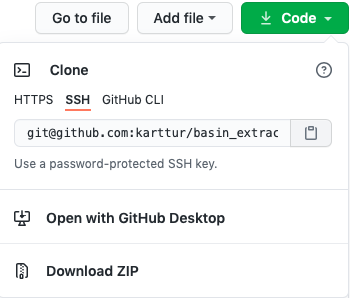 When the new repo is created, click on the green button . There are (in November 2020) 4 alternatives for cloning, plus the additional options [Open with GitHub Desktop] and [Download ZIP]. Copy the text for the clone alternative [SSH], as shown in the figure to the right.
Clone to local repo
Open a Terminal window on your local machine and cd to the parent directory where you want to create the clone of your remote (GitHub) repository. Then type (but do not execute):
$ git clone
If you followed the instructions in the previous section, you can now just paste the SSH link from your clipboard to the command line:
$ git clone git@github.com:karttur/basin_extract.git
Execute the command and the remote repo (“basin_extract”) should clone to your local machine. If this is the first time you use the SSH key, you will be prompted the following statement and question:
Cloning into 'basin_extract'...
The authenticity of host 'github.com (140.82.118.4)' can't be established.
RSA key fingerprint is [.....].
Are you sure you want to continue connecting (yes/no)?
Answer with a full yes
The cloning will only take a few seconds, and the result is reported at the terminal prompt:
Cloning into 'basin_extract'...
remote: Enumerating objects: 4, done.
remote: Counting objects: 100% (4/4), done.
remote: Compressing objects: 100% (4/4), done.
remote: Total 4 (delta 0), reused 0 (delta 0), pack-reused 0
Receiving objects: 100% (4/4), 12.54 KiB | 2.51 MiB/s, done.
Change direction (cd) to the newly cloned repo and list (ls) the content:
$ cd basin_extract
$ ls
if you instead type (ls -a) also hidden files will be listed, including .git.
$ ls -a
The post on Local git control explains how to Check and setup user name.
You can check the remote repo associated with your local clone:
git remote -v
origin	git@github.com:karttur/basin_extract.git (fetch)
origin	git@github.com:karttur/basin_extract.git (push)
Check out the branches and history:
$ git log --all --decorate --oneline --graph
* a5a7152 (HEAD -> main, origin/main, origin/HEAD) Initial commit
For the clone we are working with the HEAD pointer points towards two new items: origin/main and origin/HEAD. As origin can be seen as an alias for the primary remote repo, the pointing is towards the remote (GitHub) repo. As HEAD is pointing both towards the local main and the remote main, our local repo is in sync with the GitHub repo.
Create/edit .gitignore file
Open/create the file .gitignore using for example the terminal editor pico.
$ pico .gitignore
Add the following items to ignore:
.DS_Store
*.pyc
__pycache__/
The first item (.DS_Store) is an internal Mac OSX file, the second (*.pyc) is a wildcard for ignoring all python cache files and the last item (__pycache__/) is the directory holding the python cache files.
Hit [ctrl]+[X] to exit pico and save the edits by pressing Y when asked.
Stage and commit I
With edits done to the .gitignore you can stage (add) and commit (lock in and save) the changes to your local git repository:
git add .
git commit -m 'created .gitignore'
As this is the first time you stage something you have to use the separate git add . command.
If all the files that you want to commit have already been staged before, you can shorten the two commands to:
git commit -am 'created .gitignore'
Create or copy PyDev project
The repo (basin_extract) only contains the README, LICENSE and .gitignore files (plus .git). The Python package that you want to develop with the help of git must be either created inside the repo or, if you have already started the package, copied into it. As I have already built a first version of the Python package basin_extract, I copy the complete structure into the repo. The initial structure of basin_extract thus becomes (leaving out the content of .git and adding comments):
.
|____README.md # initial README markdown (md) text file
|____.gitignore
|____.git
|____basin_delineate # This is the Eclipse project (containing the package)
| |____.project # definition of the Eclipse project
| |____.pydevproject # definition of the Eclipse PyDev project
| |____basin_extract # The main python package
| | |______init__.py # Python default initiation script file
| | |____basin_extract.py # The main python module
| |____params # Python package for setting parameters
| | |____be_params.py # python module for setting parameters
| | |______init__.py # Python default initiation script file
| | |____be_xml.py # python package for reading xml parameters
| |____ds_manage # python package for spatial data source (ds) management
| | |______init__.py # Python default initiation script file
| | |____datasource.py # python module for patial data source (ds) management
Stage and commit II
Stage and commit the complete project in your local clone of the repo basin_extract.
git add .
git commit -m 'initial commit of PyDev project'
The check the status of your repo:
$ git status
On branch main
Your branch is ahead of 'origin/main' by 1 commit.
  (use "git push" to publish your local commits)

nothing to commit, working tree clean
Or with the more decorated option:
$ git log --all --decorate --oneline --graph
* 1430b14 (HEAD -> main) initial commit of PyDev project
* a5a7152 (origin/main, origin/HEAD) Initial commit
Push to origin
Push the committed changes to your remote repo on GitHub:
git push <REMOTENAME> <BRANCHNAME>
$ git push origin main
Enumerating objects: 1139, done.
Counting objects: 100% (1139/1139), done.
Delta compression using up to 4 threads
Compressing objects: 100% (1104/1104), done.
Writing objects: 100% (1138/1138), 8.10 MiB | 3.79 MiB/s, done.
Total 1138 (delta 229), reused 0 (delta 0)
remote: Resolving deltas: 100% (229/229), done.
To github.com:karttur/basin_extract.git
   a5a7152..1430b14  main -> main
$ git status
On branch main
Your branch is up to date with 'origin/main'.

nothing to commit, working tree clean
Create local dev branch
Create a local development (dev) branch.
$ git checkout -b "dev"
Switched to a new branch 'dev'
$ git branch [-r] [-a] [-r] to see only remote branches, [-a] to see all branches.
* dev
  main
A minute edit
Do some small editing to any of the files in the repo, just for illustration really. As all files are already staged, you can stage and commit in one command:
$ git commit -a -m "update be_params.py"
[dev 4cc0223] update be_params.py
 1 file changed, 96 insertions(+), 97 deletions(-)
$ git log --all --decorate --oneline --graph
* 4cc0223 (HEAD -> dev) update be_params.py
* 1430b14 (origin/main, origin/HEAD, main) initial commit of PyDev project
* a5a7152 Initial commit
HEAD is now pointing at the branch dev and the remote repo (with the alias origin) is out of sync still pointing at masin.
Upload branch
Upload the branch dev to the repo
$ git push origin dev
Enumerating objects: 9, done.
Counting objects: 100% (9/9), done.
Delta compression using up to 4 threads
Compressing objects: 100% (5/5), done.
Writing objects: 100% (5/5), 975 bytes | 975.00 KiB/s, done.
Total 5 (delta 3), reused 0 (delta 0)
remote: Resolving deltas: 100% (3/3), completed with 3 local objects.
remote:
remote: Create a pull request for 'dev' on GitHub by visiting:
remote:      https://github.com/karttur/basin_extract/pull/new/dev
remote:
To github.com:karttur/basin_extract.git
 * [new branch]      dev -> dev
$ git log --all --decorate --oneline --graph
* 4cc0223 (HEAD -> dev, origin/dev) update be_params.py
* 1430b14 (origin/main, origin/HEAD, main) initial commit of PyDev project
* a5a7152 Initial commit
HEAD is pointing towards the branch dev, also in the remote repo (origin/dev).
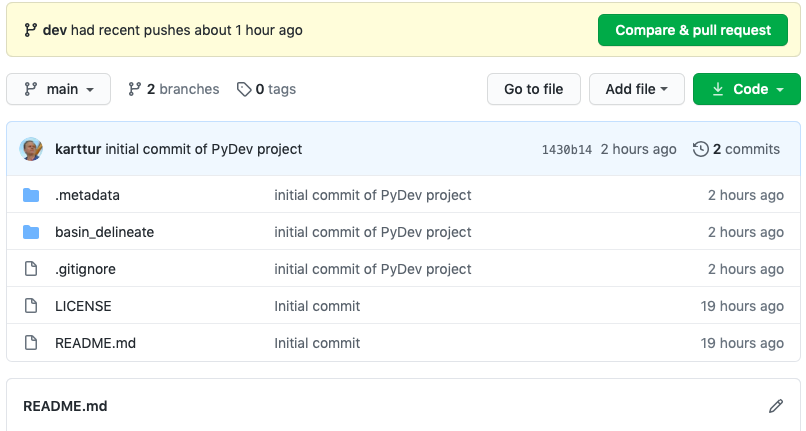
Return to the online (remote) GitHub repo basin_extract.
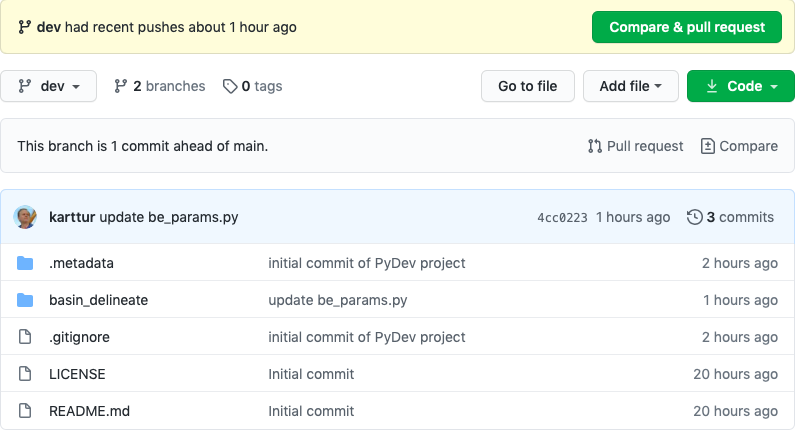
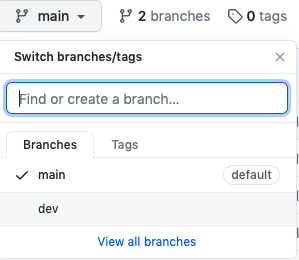 Change to the branch dev by clicking the branch button, as illustrated to the right. The page for the dev branch (below) tells you that This branch is 1 commit ahead of main.. Thus we know that all has worked out as we intended.